




- Feb 4, 2026
- 2
- 1
- 1
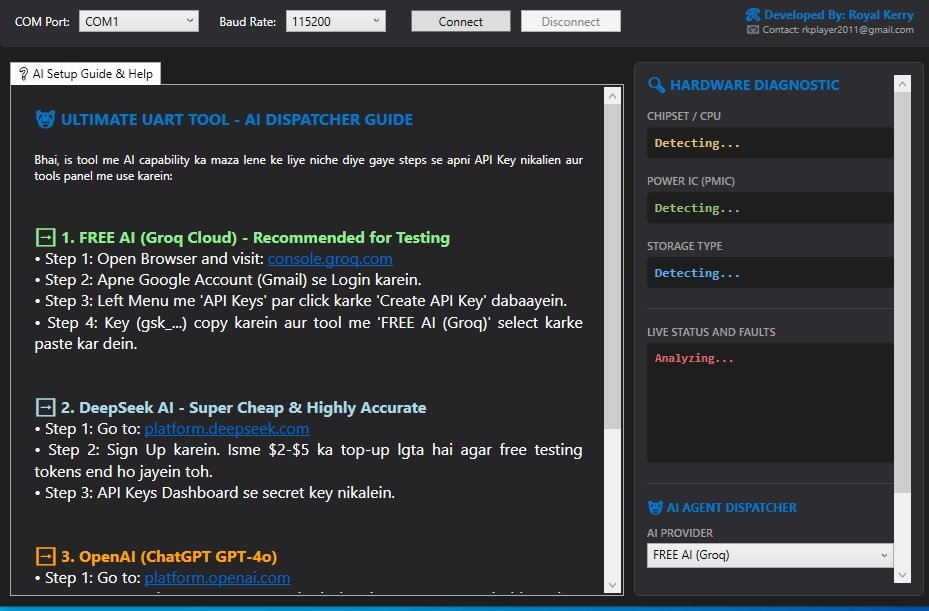
I'm happy to release Ultimate UART Tool, a 100% FREE, standalone, and offline utility developed for the global smartphone repair community. It helps technicians analyze real-time UART boot logs from Android devices and quickly identify hardware-related issues.
No activation required.
No server credits.
No subscriptions.
Completely free forever.
 Features
 Dynamic Chipset Detection
Automatically detects supported platforms as soon as the boot log begins.
Supports MediaTek Preloader and Unisoc/Spreadtrum (SharkL series) devices.
Offline Hardware InspectorDetects and displays:
CPU Information
PMIC IDs
eMMC/UFS Storage Status
RAM Initialization
Boot Stages
Smart Bootloop DetectionAutomatically detects repetitive preloader boot loops.
Freezes the log to prevent endless scrolling and makes analysis easier.
Integrated AI AnalysisSupports external AI services such as:
Groq Cloud (Llama 3)
DeepSeek
OpenAI API
The AI translates cryptic boot errors, kernel panics, and miscdata issues into easy-to-understand hardware troubleshooting steps in English or Hindi.
Built-in Help CenterAPI registration guide
Setup instructions
Usage documentation
 IMPORTANT UART SAFETY WARNING
DO NOT connect the TX pin from your Box/UART converter to the phone motherboard.
Most smartphone UART interfaces operate at approximately 1.8V logic. Some repair boxes may output higher voltage levels on their TX line during initialization.
Connecting the Box TX directly to the phone's UART test point can potentially damage the device.
Safe Connection
✔ Connect RX to the phone's TX test point.
✔ Connect GND to motherboard ground.
 Leave the TX line disconnected unless you specifically know the target hardware supports bidirectional communication.
 Finding RX & GND
UFI Box / EasyJTAG Plus (ISP Adapter)
Simply connect the ISP adapter.
GND → Phone Ground
RX (or corresponding receive line on the adapter) → Phone UART TX
RJ45 UniBox Interfaces
Many professional boxes expose UART through the RJ45 connector.
Typically:
Pin 7/8 → Ground
Pin 2/3 → RX
Always verify your specific box's pinout using the manufacturer's documentation or a multimeter before making any connections.
 Quick Start
Connect your UART interface (CP2102 / FTDI / UniBox).
Install the proper USB Serial drivers.
Open UltimateUARTTool.exe.
Select the correct COM Port.
Choose 115200 Baud (recommended for most MTK/Unisoc preloaders).
Click Connect.
Power on the phone or trigger boot mode.
Live UART logs will begin streaming automatically.
 * Developer
Ritesh Dhakad (Royal Kerry)
Support Email: rkplayer2011@gmail.com
License: 100% Free Community Tool
If you encounter an unknown boot error or hardware fault, simply post the UART log. I'll continue improving the parser and offline analysis modules based on community feedback.
 Download
https://drive.google.com/file/d/15wC...usp=drive_link
Happy Repairing!
