


JOIN US ON TELEGRAM GROUP FOR HELP , SUPPORT AND DISCUSSION
UAT PRO Official Support
 PC CHANGE TIME IS 60 MINUTES
 AUTO API IS AVAILABLE FOR ALL DISTRIBUTORS AND RESELLERS
 NEW RESELLERS ARE WELCOME
UAT PRO Official Support
PC CHANGE TIME IS 60 MINUTES AUTO API IS AVAILABLE FOR ALL DISTRIBUTORS AND RESELLERS NEW RESELLERS ARE WELCOME
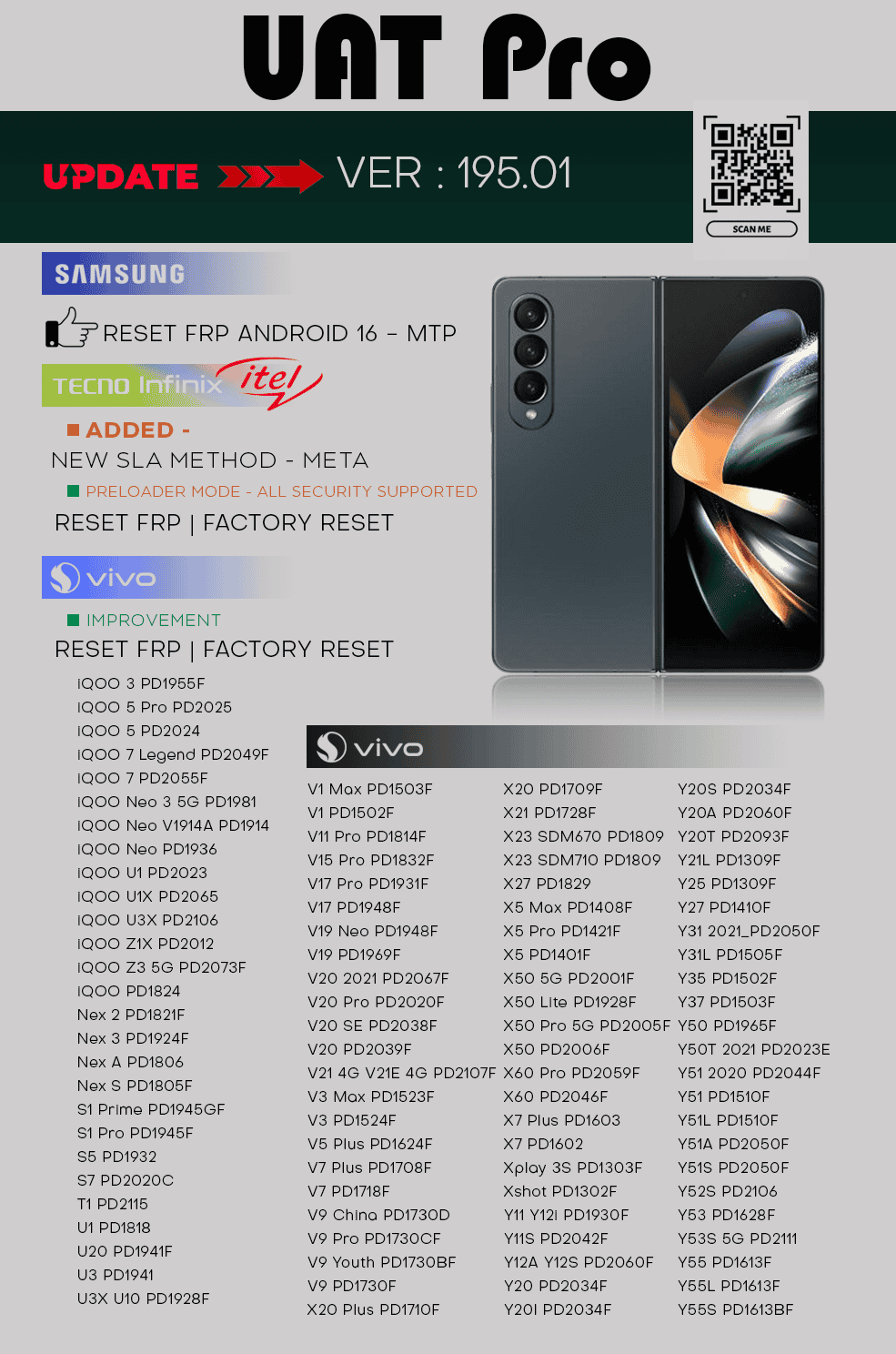
UAT PRO Version : 195.01
Release Notes:
 SAMSUNG
 ADDED - RESET FRP - ANDROID 16 - MTP METHOD
 TECNO | INFINIX | ITEL
 ADDED - NEW SLA METHOD - META
- Preloader Mode - All Security Supported
RESET FRP | FACTORY RESET
 VIVO
VIVO IMPROVED - Vivo Qualcomm Protocol
RESET FRP | FACTORY RESET
 iQOO 3 PD1955F iQOO 5 Pro PD2025 iQOO 5 PD2024 iQOO 7 Legend PD2049F iQOO 7 PD2055F iQOO Neo 3 5G PD1981 iQOO Neo V1914A PD1914 iQOO Neo PD1936 iQOO U1 PD2023 iQOO U1X PD2065 iQOO U3X PD2106 iQOO Z1X PD2012 iQOO Z3 5G PD2073F iQOO PD1824 Nex 2 PD1821F Nex 3 PD1924F Nex A PD1806 Nex S PD1805F S1 Prime PD1945GF S1 Pro PD1945F S5 PD1932 S7 PD2020C T1 PD2115 U1 PD1818 U20 PD1941F U3 PD1941 U3X U10 PD1928F V1 Max PD1503F V1 PD1502F V11 Pro PD1814F V15 Pro PD1832F V17 Pro PD1931F V17 PD1948F V19 Neo PD1948F V19 PD1969F V20 2021 PD2067F V20 Pro PD2020F V20 SE PD2038F V20 PD2039F V21 4G V21E 4G PD2107F V3 Max PD1523F V3 PD1524F V5 Plus PD1624F V7 Plus PD1708F V7 PD1718F V9 China PD1730D V9 Pro PD1730CF V9 Youth PD1730BF V9 PD1730F X20 Plus PD1710F X20 PD1709F X21 PD1728F X23 SDM670 PD1809 X23 SDM710 PD1809 X27 PD1829 X5 Max PD1408F X5 Pro PD1421F X5 PD1401F X50 5G PD2001F X50 Lite PD1928F X50 Pro 5G PD2005F X50 PD2006F X60 Pro PD2059F X60 PD2046F X7 Plus PD1603 X7 PD1602 Xplay 3S PD1303F Xshot PD1302F Y11 Y12i PD1930F Y11S PD2042F Y12A Y12S PD2060F Y20 PD2034F Y20I PD2034F Y20S PD2034F Y20A PD2060F Y20T PD2093F Y21L PD1309F Y25 PD1309F Y27 PD1410F Y31 2021_PD2050F Y31L PD1505F Y35 PD1502F Y37 PD1503F Y50 PD1965F Y50T 2021 PD2023E Y51 2020 PD2044F Y51 PD1510F Y51L PD1510F Y51A PD2050F Y51S PD2050F Y52S PD2106 Y53 PD1628F Y53S 5G PD2111 Y55 PD1613F Y55L PD1613F Y55S PD1613BF Y65 PD1621BF Y66 PD1621 Y70 PD2038F Y71 PD1731F Y72 5G_PD2112F Y85 PD1730BF Y91 PD1818EF Y93 PD1818F-BF Y95 PD1818F-BF Z1 Pro PD1911F Z1X PD1921F Z5x PD1911F For Users Offering Software Rental services
If you provide software on rent for a specific duration (such as 1, 2, or 3 hours), you can now remotely close the tool-even
after the rental time has ended without accessing your client's PC.
Simply manage it from the Official Website → Account Tab.
For Remote Work Technicians Lost Client PC Connection?
If your connection to the client’s PC is lost but the tool remains open on their system — no need to change your password.
 Close Tool Remotely
You can now close the tool directly from Official Website → Account Tab, even without direct access to the client’s PC.
 Track Usage History
View when and where you last used the tool, including detailed location and timestamp information.
 Check Real-Time Status
Instantly see whether the tool is currently online or offline — all from the Official Website → Account Tab.
 Instant PC Change Option
You can now switch to a new PC instantly — no need to wait for a 60-minute reset.
Simply go to the Official Website → PC Change Tab to make the switch.
D o w n l o a d L i n k