


- Mar 24, 2025
- 77
- 3
- 18
Android Win Tool V1.2.9 New Update With Latest Features
The Android Win Tool is a popular software used by mobile repair technicians and advanced Android users. It helps with different Android tasks like unlocking, flashing, removing FRP, bypassing security, and more. In April 2025, the developers released a new version – Android Win Tool V1.2.9. This latest update brings many exciting features, support for more devices, and performance improvements.
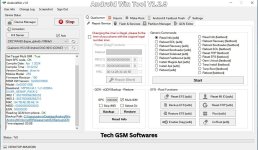
Supported Modes:
The tool works with different connection modes. These modes help the tool communicate with your phone:
A. MTP Mode (Media Transfer Protocol)
- For devices in normal mode.
- Helps with Samsung FRP bypass without needing Recovery or Fastboot.
B. ADB Mode (Android Debug Bridge)
- Allows advanced commands if USB debugging is enabled.
- Helps reset screen lock, uninstall apps, or reboot the phone.
C. Fastboot Mode
- Used to flash firmware, unlock the bootloader, or wipe data.
D. EDL Mode (Emergency Download Mode)
- Mainly for Qualcomm devices.
- Can recover dead phones or bypass locks.
Main Features in Android Win Tool V1.2.9:
Let’s break down the most useful features in this version.
A. FRP Bypass (Google Lock)
- Helps remove Google account verification.
- Works on Android 5 to Android 13+.
- Samsung FRP via MTP and ADB is supported.
B. Unlock Screen Lock
- Can remove pattern, PIN, password, or fingerprint lock.
- No data loss on some models (ADB mode).
C. Mi Account Remove
- Works on Xiaomi phones with locked Mi accounts.
- Supports new security patches with patch certificate.
D. Bootloader Unlock
- Easily unlock bootloader for fastboot-enabled phones.
- Useful for rooting or custom ROM installation.
E. Reboot Options
- One-click reboot to Recovery, Fastboot, EDL, or normal mode.
F. App Manager (ADB Mode)
- List all installed apps.
- Uninstall bloatware or system apps.
G. Factory Reset / Wipe Cache
- Wipe user data or cache from Fastboot or Recovery mode.
- Helps fix boot loops or lagging issues.


 Full Setup Download Link ◀